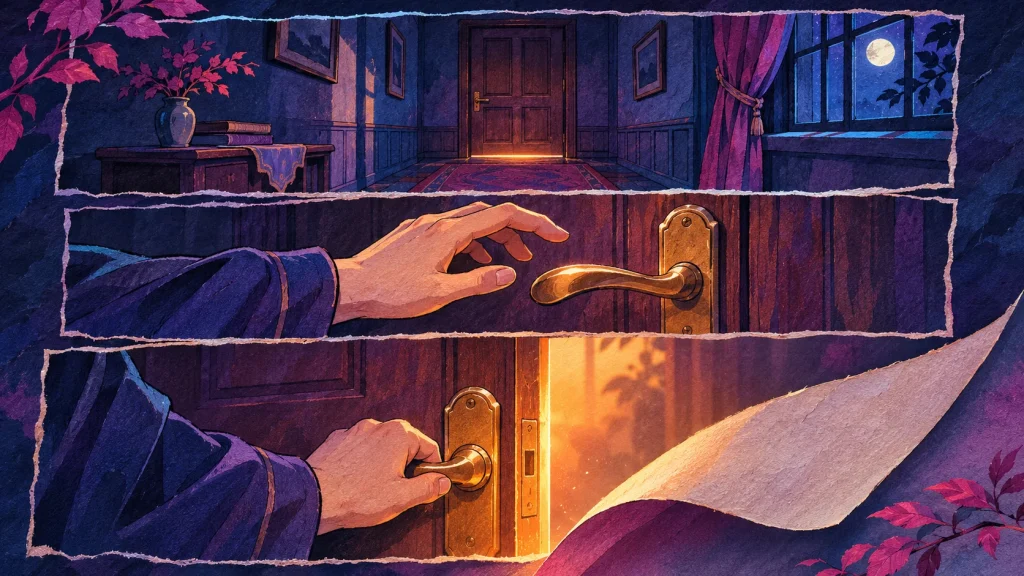

Imagine a comic that opens in a quiet corridor. It’s late. There’s a thin line of light beneath a wooden door, and something on the other side has just fallen over.
In the next panel, a hand reaches for the handle.
Now you have to turn the page.
That little movement gives the moment somewhere to hang. You can rush straight through, linger over the drawing or hesitate because you’re enjoying the suspense. The artist has put a door in the story and, for a second, you’re the one who gets to open it.
An interactive comic can build that moment around a tap, a click or a scroll. The question is where to put it. Show the answer too early and the surprise may disappear. Make someone wait too long and they may start wondering whether the page has broken.
Let’s follow our imaginary visitor down the corridor and see what changes when we change how the next panel arrives.
Give the pause something to do
For this little story, we’ll use three panels. The first shows the closed door. The second brings us close to the hand on the handle. The third finally takes us inside: a ginger cat sits beside an overturned tin, with buttons scattered across a warmly lit workroom.
The noise was the cat’s fault. Probably.
There’s no choice of ending here, and there doesn’t need to be. The reader’s part is deciding when to move on. That’s enough to give the page turn a job: it carries us from wondering what’s inside to finding out.
Before adding any clever effects, ask what the reader should know at each point. In the corridor, we know somebody might be awake. At the handle, we’re about to intrude. Inside, the buttons explain the noise and the cat changes the mood.
Those small steps are worth protecting. If the cat is already visible beside the closed door, we’re reading a different scene. We might enjoy watching the visitor get a fright when we know there’s nothing to fear. That could be lovely too, but it’s a different joke.
A click can feel like opening the door
Try showing the corridor and the reaching hand together, then asking for one click before revealing the room. The reader has seen enough to become curious. Their next action answers that curiosity.
You could make the handle itself clickable, though it needs to look like something they can use. A beautiful drawing that secretly doubles as a button can leave people hunting around. A small, clear “Open the door” control might serve the scene better.
It’s also worth asking how often you’re asking for a click. If every tiny movement needs one, the reader could spend the whole journey pressing forward: approach door, raise hand, touch handle, turn handle, push door. That might suit a tense moment where each movement matters. For our curious visitor, it could feel like a lot of work to meet a cat.
Start with the fewest clicks that let the scene breathe. Add another only when you can explain what the extra pause gives us.
A page turn can also reveal several panels at once. That lets the reader explore the room, notice the buttons and then spot the cat. Showing the whole page means accepting that their eyes may go straight to the funniest detail. If the order really matters, give that detail its own reveal.
A scroll lets the reader carry the rhythm
Now arrange the same scene down a long page. The corridor comes first, the hand sits below it, and the workroom waits further down.
The reader moves through with their thumb or mouse. They can ease towards the next panel, skim ahead or roll back to look again. You’ve given them a path, but they decide how quickly to travel along it.
Space between panels becomes useful here. A gap after the hand can hold the room out of sight for a little longer. A smaller gap can make the reveal follow almost immediately. Neither gives you an exact number of seconds: people scroll differently, and their screens show different amounts of the page.
That’s why a huge stretch of empty space is a gamble. It may suggest a long, uneasy silence. It may also look as though the next image hasn’t loaded. Try enough space to make the break noticeable, then check whether it still feels connected to the story.
Watch the bottom edge of the screen as well. On one phone, the cat may be completely hidden until the next swipe. On a larger display, its ears might already be peeking into view. You can enjoy that glimpse as part of the scene, or use a deliberate reveal if keeping the secret matters more. The useful question is what the reader can actually see before they move.
Let people take their time
It’s tempting to add a timed pause: the handle turns, the door creaks open, and three seconds later the room appears. You’ve imagined a lovely rhythm and want everyone to experience it.
But someone may still be reading a caption. Someone else may have understood the picture immediately. Another reader might have looked away to answer a question. A fixed delay can miss all three.
For our scene, a short optional animation could be a nice touch. Let the reader open the door when they’re ready, and let them skip the movement or see a still version. The cat and the spilled buttons can carry the ending without a perfectly timed effect.
Longer automatic movement needs care. W3C’s guidance on pausing moving content says nonessential movement that starts automatically, lasts more than five seconds and appears alongside other content needs a way to pause, stop or hide it. That matters if, say, the corridor’s shadows keep drifting while someone tries to read.
Also give people a comfortable way back. After meeting the cat, a reader may want another look at the corridor. Was there a clue? Did they miss a tiny paw beneath the door? Letting them return without replaying every delay keeps that curiosity enjoyable.
Keep the story together on a small screen
A wide row of three panels may look lovely on a laptop. Squeeze it onto a phone and the hand, handle and scattered buttons can become much harder to make out.
Stacking the panels is one possible answer. Check the drawings at that size, though. Can you still recognise the tin? Can you read the caption without pinching and zooming? Does the cat’s expression survive?
Keep the reading order clear in the page’s underlying structure too. W3C’s guidance on meaningful sequence says that when order affects meaning, software needs to be able to determine the correct sequence. For our story, the corridor, hand and room should remain in that order when someone follows the page with assistive technology.
It helps to think about what each panel needs to communicate before polishing the layout. The hand tells us the door is about to open. If a crop hides the handle, we’ve lost a useful piece of the story.
Watch someone meet the cat
Once you have a rough version, ask someone to read it without explaining how it works. Stick figures and simple boxes will do if they make the action clear.
Notice where they pause, where they try to click and whether they can get back to a previous panel. If they stop, give them a moment. They might be enjoying the drawing. They might be stuck. Asking afterwards is more useful than guessing.
Keep the questions ordinary: “When did you realise what was behind the door?” “Was there a moment when you weren’t sure what to do?” “Did anything move on before you were ready?”
One reader won’t tell you how everybody will respond, but their experience can give you something concrete to revisit. If they saw the cat early, look at the screen’s edge. If they kept clicking the drawing, look at how you’ve shown the controls. If they wanted to linger, give them room.
Then change one thing and try the scene again. Move the reveal to the next page, shorten a gap or remove an unnecessary click. Keep the drawings the same so you can concentrate on how it feels to move between them.
Our little corridor doesn’t need much: a noise, a hand, a moment of curiosity and a cat with some explaining to do. A well-placed page turn gives the reader a chance to enjoy each part.
You can find more stories about games and interactive worlds in the GamersMess Journal.